Find a setting
See which settings group holds each setting, so you can go straight to the one you need.
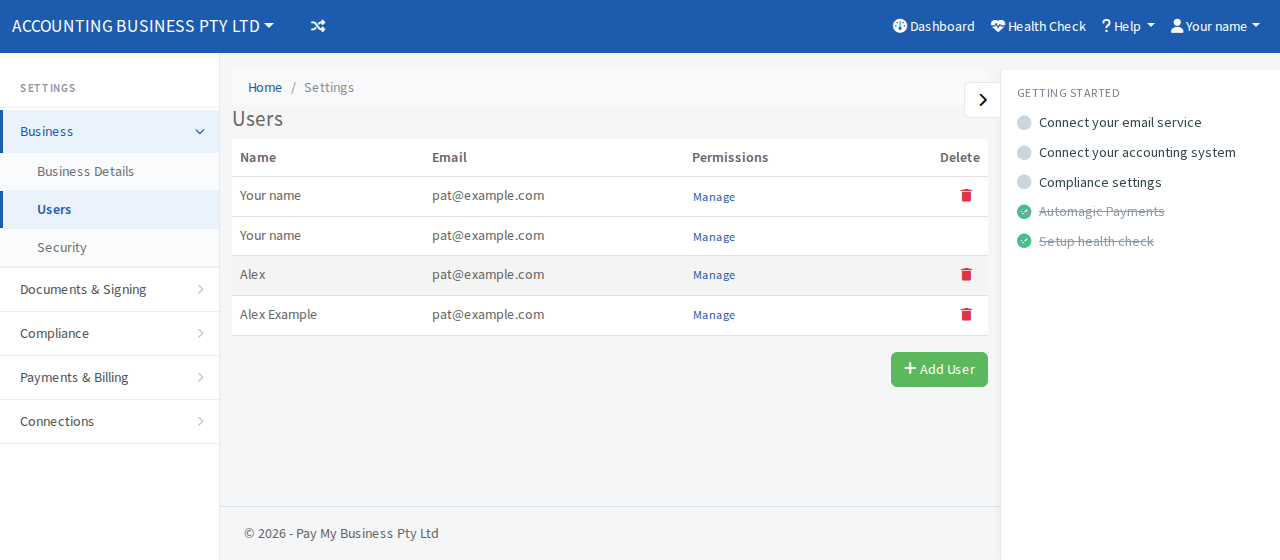
Open Settings from the top bar. The settings are in groups in a menu beside the page. Select a group to open it, then choose the page you want. On a phone the groups open from the menu.
The groups
- Business: Business Details (name, contacts, address, logo, terms link), Users and Security. See Update your business details, Add a team member and Add a passkey.
- Documents & Signing: Forms, Custom Terms, Signing Rules (customer type, who must sign, sign with selfie), After Signing, Email Templates and Proposal Builder.
- Compliance: Accountant, for registered tax and BAS agents. See Verify your tax or BAS agent registration.
- Payments & Billing: Payment Terms, AutoPilot (Turn on AutoPilot), AutoMagic Payments, Recurring Billing and Billing. See Set your default payment terms, AutoMagic Payments and See your plan and billing details.
- Connections: Email, Contacts, Webhook (Set up a webhook), Embeddable Forms (Put your form on your website) and Integrations (job management, accounting, storage and marketing). See what you can connect.