
Choose what a team member can do
Switch individual permissions on or off for each person on your account.
Each person on your account has permissions that decide what they can do. New people start with all of them on.
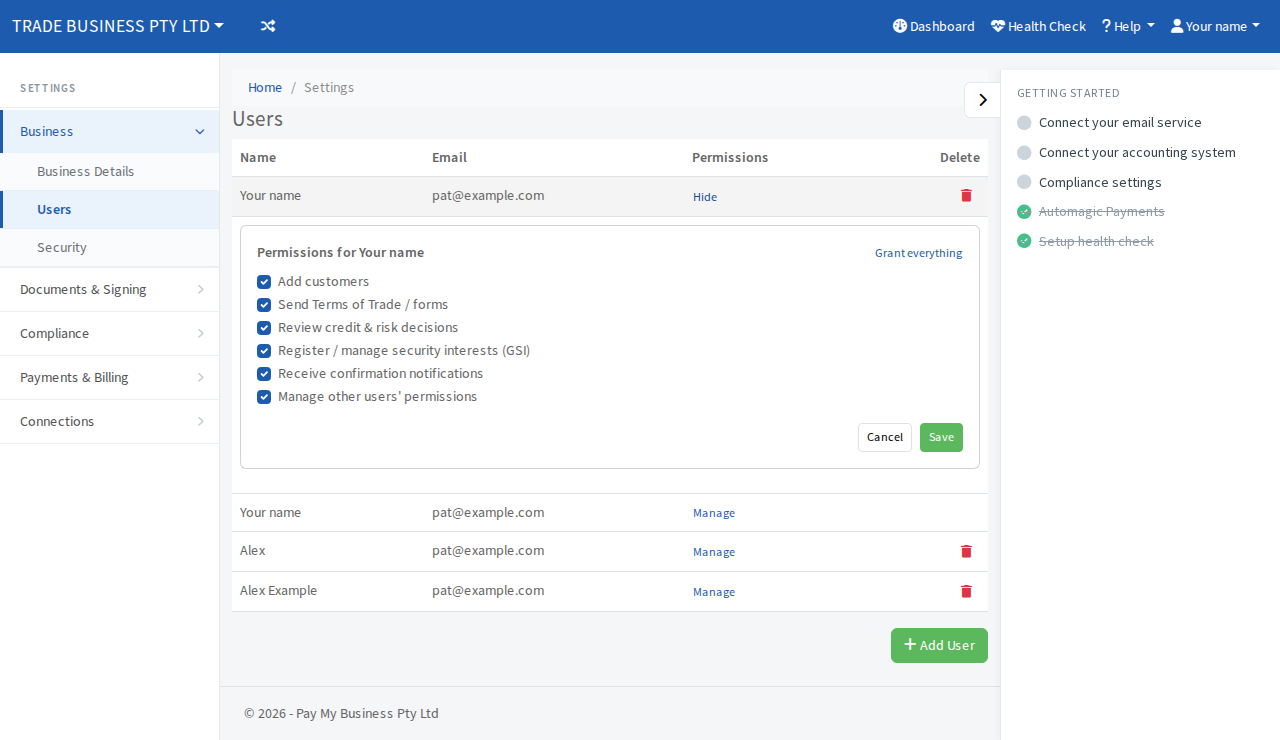
Steps
- Open Settings, then Business, then Users.
- Next to the person, select Manage under Permissions. (If you do not see Manage, you do not have permission to manage other people.)
- Tick or untick:
- Add customers
- Send Terms of Trade / forms
- Review credit & risk decisions
- Register / manage security interests (GSI)
- Receive confirmation notifications
- Manage other users' permissions
- Select Save. To switch everything on, select Grant everything first.
When it works, a green message says Permissions updated.
Be careful with one permission
Manage other users' permissions lets a person change everyone else's permissions, including yours. Give it only to people you trust with the account.