
Send your first Terms of Trade
Send your first customer a link to read and sign your terms, and know what to expect next.
Your customer signs your terms through a link. You can send that link in two ways.
Send a prefilled link by email
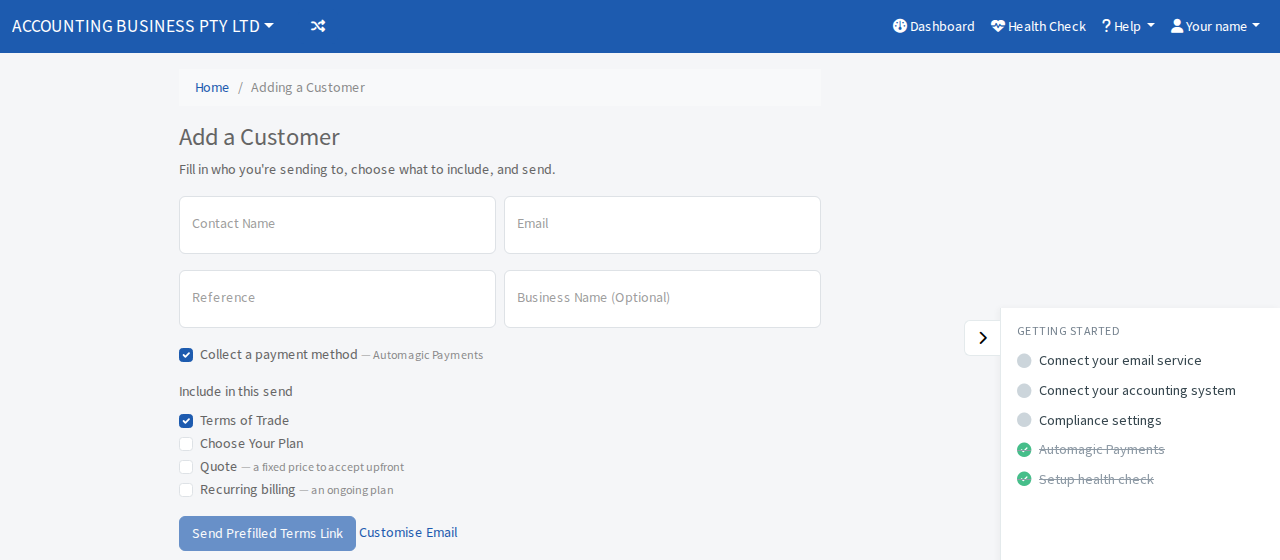
- Select Add a customer on the Dashboard.
- Enter the customer's Contact Name and Email. Reference and Business Name (Optional) help you find them later.
- Under Include in this send, leave Terms of Trade ticked. You can also tick Quote or Recurring billing.
- If you use AutoMagic Payments, you also see Collect a payment method. Leave it ticked so the customer leaves a card or bank account when they sign. See AutoMagic Payments.
- Select Send Prefilled Terms Link. A window shows the email. Select Send to email it. The full steps are in Add a customer.
Share your terms link yourself
Your Terms Link is at the top of the dashboard. Select Copy and paste it into an email, text message, your website or a quote. See Update your business details to change its ending.
What happens next
- Your customer opens the link, completes the form and signs.
- A customer record is created only after the customer submits their signed terms. Until then they appear under the dashboard's waiting lists, for example Prefilled terms pending (sent).
- When they finish, the customer moves to the next step in your credit process, such as Set Payment Terms.