
See your plan and billing details
Check what Pay My Business charges your firm, when you are billed and how to move to a higher plan.
See what you are charged
- Open Settings, then Payments & Billing, then Billing.
- Read the table at the top.
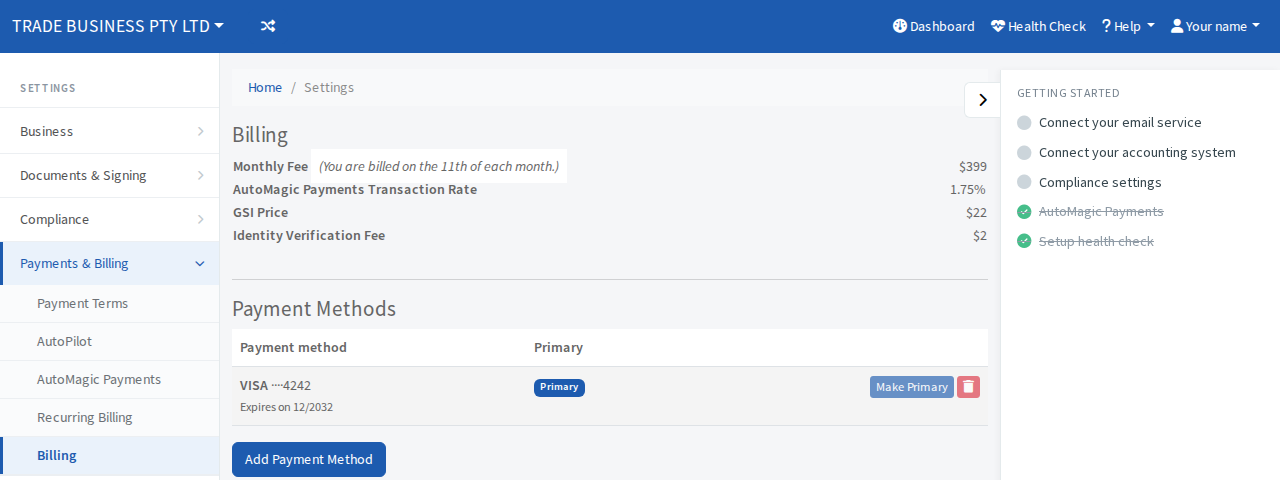
- Monthly Fee is your plan price. Beside it, a note says which day you are billed: the 1st, 11th or 21st of each month.
- AutoMagic Payments Transaction Rate is the fee on each payment you take.
- GSI Price is the charge for each General Security Interest registration.
- Identity Verification Fee is the charge for each identity check.
The plans
- Business: $99 a month. AutoMagic Payments fee of 2.5%.
- Trades: $199 a month. Fee of 2.0%.
- Compliance: $399 a month. Fee of 1.75%.
A GSI registration is $22 on every plan.
Every plan includes Terms of Trade signing, AutoMagic Payments, manual invoicing, GSI registrations and the customer portal. Quotes and proposals and invoice auto-read (upload a PDF and skip typing the total) are also included.
Trades adds failed-payment recovery, accounts-receivable ageing, Buy Now, Pay Later and job management connections.
Compliance adds everything in Trades plus the compliance tools: beneficial-ownership resolution, the Compliance timeline and recoverable compliance charges. Sanctions screening is on every plan. Compliance is reached by verifying your tax practitioner registration in the Accountant settings, not by upgrading from this page.
Prices are what the app shows today. Check the Billing page for your own.
Move to a higher plan
- Open Settings, then Payments & Billing, then Billing.
- If an upgrade is available, a page shows the plan and its monthly price. Select the Upgrade to Trades button.
A message confirms the new plan and its monthly price. Your plan, monthly fee and rates change together.
If you are already on the right plan you are taken back to the dashboard with a message saying so.