
Set your default payment terms
Choose which payment terms you offer customers and which one is the starting choice when you approve someone.
Every business offers different credit terms. This page sets the list you choose from when you approve a customer, and the default that is selected for you.
Steps
- Open Settings, then Payments & Billing, then Payment Terms.
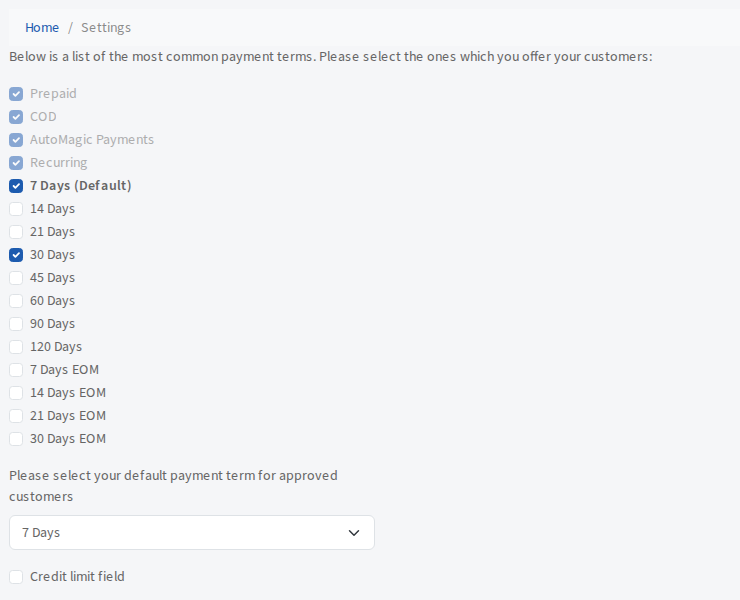
- Tick each term you want to offer. The list includes 7, 14, 21, 30, 45, 60, 90 and 120 days and 7, 14, 21 and 30 days EOM (end of month).
- Under "Please select your default payment term for approved customers", choose the default. Only terms you ticked appear in this list.
There is no save button. Each change saves as soon as you make it.
Terms you cannot untick
Prepaid, COD, AutoMagic Payments and Recurring are always on. You cannot untick them.
If you untick the default
If you untick the term that is currently your default, the default is reset to Prepaid and a warning tells you so. Choose a new default if you want something else.
Credit limit field
Beneath the default is a Credit limit field tick. When it is on, you can enter a credit limit for a customer when you approve them. It is optional either way.