
What is on a customer's page
Find your way around a customer's page, from their signed terms to the next step you need to take.
On the Dashboard, search for a customer by name or select Browse Customer List, then select the customer. Their page shows the actions you can take, their story, the credit steps and, if they use AutoMagic Payments, their card and recent payments.
Customer actions

- Re-issue Terms of Trade sends their current signatories a link to sign again. See Send a customer your terms again.
- Send a form sends them a form, a quote or a recurring plan. See Send a form to a customer.
- Request commercial application appears for a customer who signed as an individual. See Correct a customer who signed as an individual.
- Add variation records a change to an agreed quote. See Add a variation to an agreed quote.
The customer's story
The credit steps run down the page from the top.
- The customer's trading name, legal name, ABN, type of entity and state. If the business has more than one registered business name, they are all listed and the one the customer chose is marked (selected).
- Sanctions screening shows whether their identity was screened and the result. A match stops you going further until you review it.
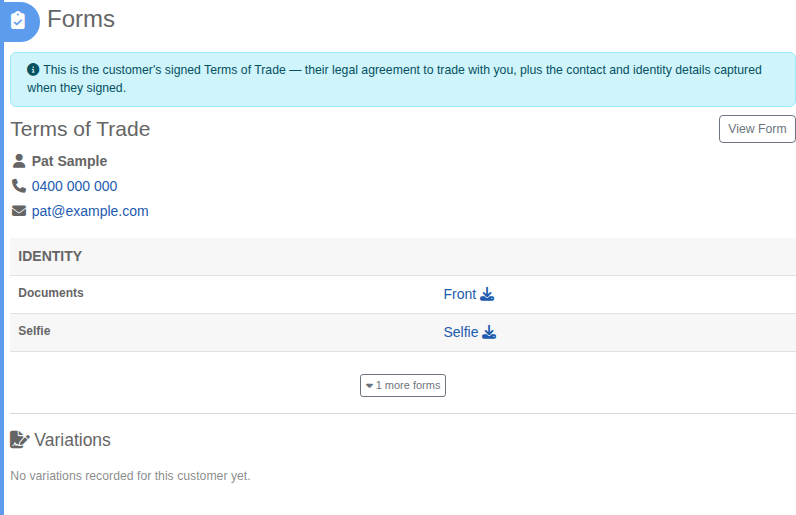
- Forms holds what they signed: a View Form button for the signed document, their contact details, their reference and the identity checks they passed. If they have signed more than one form, select more forms to see the rest. Variations you have recorded sit underneath.
The credit steps
Below the story are the steps in the credit process: Set Payment Terms, Register GSI and the finish line, Customer Secured. A Retire step sits after them for when you stop working with someone. Only the step you can do next is open.
If the customer is on recurring billing or AutoMagic Payments, their card and recent payments are shown near the top.
If something changes about the customer
If we detect a change, such as a cancelled ABN, a red box appears on their page with what changed and what to do. See Review a change we detect on a customer.