
What your customer sees when they sign your terms
Walk through the signing page from your customer's side, so you know what to tell them.
Whether you email a customer a link or give them your terms link, they land on a Terms of Trade page. It works on a phone as well as a computer.
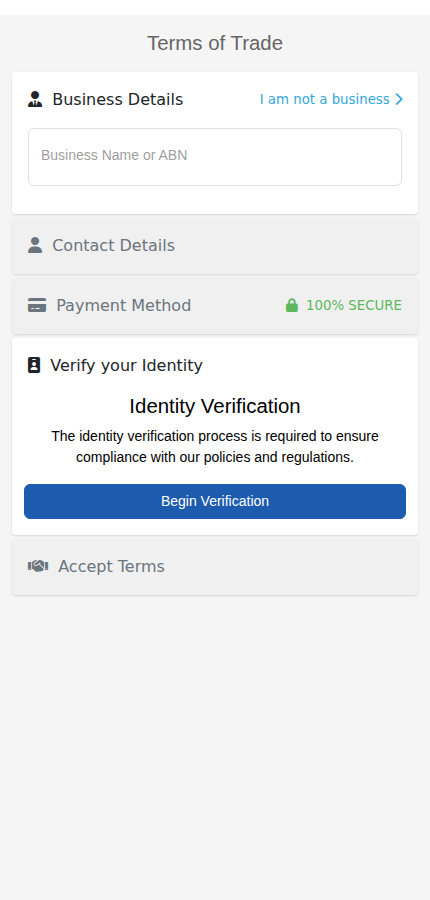
The steps your customer takes
- Business Details. They type their business name or ABN. Results appear as they type, from the Australian Business Register. They pick their business. If they are a consumer, they select I am not a business instead.
- Contact Details. Their name, email and mobile number. If you sent them a prefilled link, these are already filled in.
- Payment Method. If you use AutoMagic Payments, they give a card or bank account here.
- Verify your Identity. They select Begin Verification and follow the prompts to prove who they are. You choose how this works in your signing rules. See Set who signs and how they are checked.
- Accept Terms. They read your terms and sign. You can ask for a selfie as well. See Ask customers to sign with a selfie.
Which steps appear depends on your settings and on whether they are a business or a consumer.
What happens when they finish
They see a thank-you page, which can be your own page. See Choose what happens after a customer signs. The customer is added to your customer list. A business customer appears under Set Payment Terms on your Dashboard, ready for you to set their payment terms.