
Add a variation to an agreed quote
Record a change to the price of work your customer has already agreed to, and get it signed on the spot or by email.
A variation is a change to work you have already agreed, such as an extra coat of paint. Recording it and getting the customer to sign gives you a record of who agreed to what and when.
Before you start
The customer must have signed your terms. If you want to charge for the variation automatically, they need a card on file through AutoMagic Payments.
Steps
- Open the customer's page.
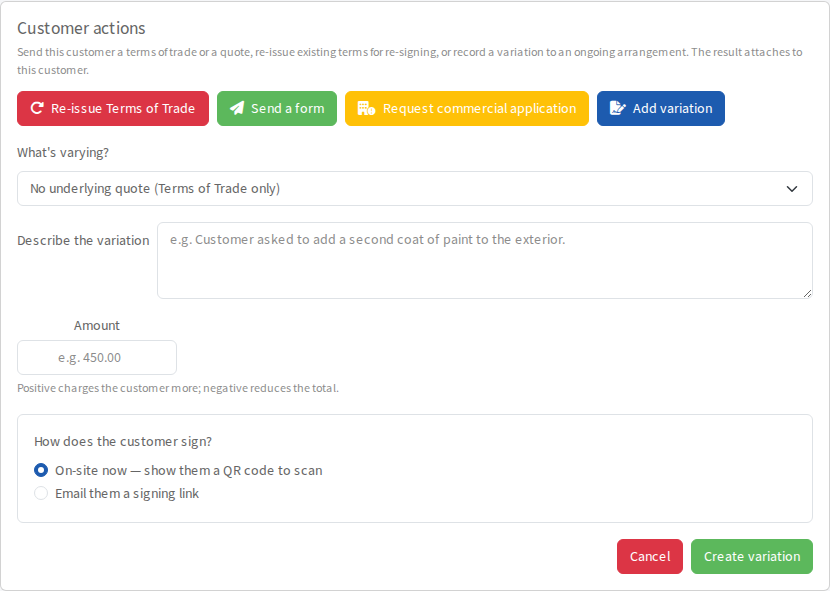
- In Customer actions, select Add variation.
- Under What's varying?, choose what the change applies to. Choose No underlying quote (Terms of Trade only) for a one-off change. If the customer has a quote, choose it, then choose a Stage if the change affects only one payment stage.
- Type a Description, for example the work the customer asked for.
- Enter the Amount in dollars. A positive amount adds to the price. A negative amount reduces it.
- Under How does the customer sign?, choose On-site now to show a QR code they scan with their own phone, or Email them a signing link.
- Select Create variation.
The customer signs on their phone. They are asked to draw their signature and may be asked to add a photo of the work and a short video or voice note agreeing to it.
After they sign
The variation appears under Variations on the customer's page. Its label moves from Awaiting signature to Signed and then Billed.
- A positive variation is charged as soon as the customer signs, to the card or bank account they left through AutoMagic Payments.
- A reduction against a quote or stage changes that quote's total, so the customer pays the smaller amount on the next payment.
- A reduction with no quote behind it cannot be refunded by Pay My Business. It is marked Needs manual credit for you to sort out yourself.