
Change the form your customers fill in
Add, remove and reorder the steps and fields on your Terms of Trade form, then save it so new customers see the change.
Your Terms of Trade form is the page your customer opens from your link. You decide which steps it has, what each step asks and the order they come in. Changes apply to the next customer who opens the link. A customer part-way through may need to reload.
Steps
- Open Settings, then Documents & Signing, then Forms.
- Select the option beside the form you want to change. The first form in the list is your Terms of Trade. The form opens below the list with a live preview on the right.
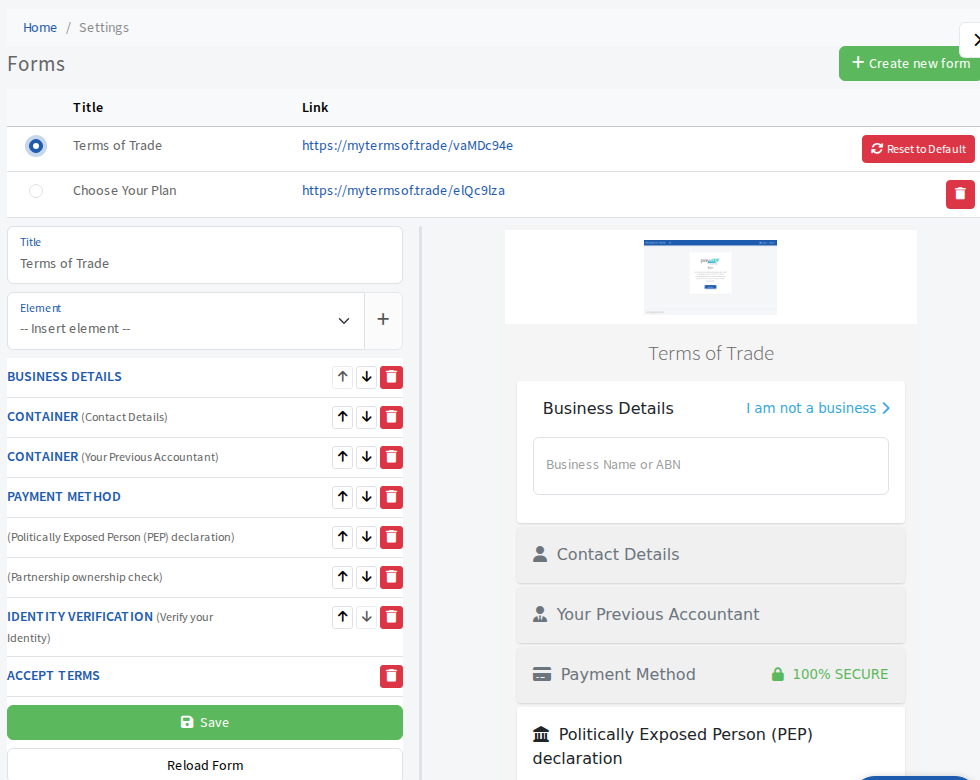
- To add a step, choose it from Element and select the plus button. The steps you can add are:
- Container (a group of your own fields, see below)
- Address, Contact Details and Business Details
- Payment Method and Payment Terms
- Choose Your Plan (your proposal tiers)
- Accept Terms, Submit Button and Identity Verification
- To reorder, use the up and down arrows beside a step. The bin button removes it. Accept Terms has no arrows because it always stays last.
- Press a step's name to open its settings. Every step has a Heading and an Icon. Open Element keeps that step expanded when the customer arrives.
- Select Save. If something looks odd in the preview, select Reload Form to load the last saved version again.
Step settings worth knowing
- Contact Details: Collect Date of Birth asks for it, and Disable Additional contacts stops the customer adding more people.
- Identity Verification: Submit on Verification submits the form as soon as the customer's identity check passes.
- Accept Terms: Terms Plan picks which of your Custom Terms documents the customer agrees to. Leave it on the default to use whichever document is currently marked default.
- The last step's Submit Label is the wording on the final button.
Add your own questions
Add a Container, open it and use its Elements list to add fields. You can add Text, Textarea, Checkbox, Email, Date, URL, Phone, Select, Radio Options, Address, Contact Details, Fullname and ABR Search, plus a Paragraph for explanatory text and a Spacer. Open a field to set its label, placeholder, options and description, and tick Required if the customer must answer it.