
Add your own Terms of Trade
Import your own terms or start from one of ours, then check every clause so you are ready to make it live.
Custom Terms are your own Terms of Trade documents. You can import one you already have or copy one of our templates and change it. Only your account sees them.
A new document always starts as a draft and is never made live by itself, so you can review it first.
Import a document
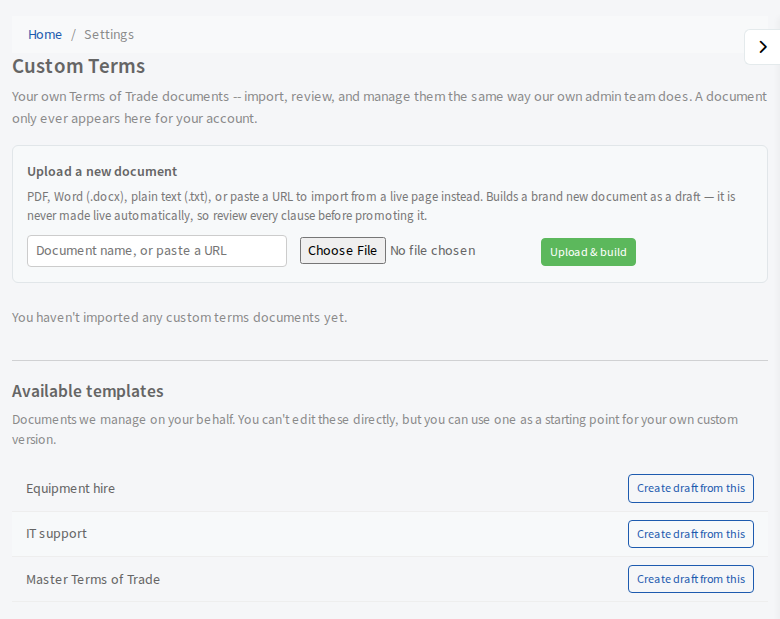
- Open Settings, then Documents & Signing, then Custom Terms.
- Under Upload a new document, choose how to bring it in:
- To upload a file: type a name for the document, then select Choose File. PDF, Word (.docx) and plain text (.txt) files are accepted.
- To import from a web page: paste the address of the live page into the name box instead.
- Select Upload & build. The document is split into clauses and opens as a draft.
Start from one of our templates
Under Available templates, select Create draft from this beside the one you want (for example Equipment hire, IT support or Master Terms of Trade). Type a name for your copy when asked. You cannot edit our templates, but your copy is yours to change.
What happens next
The draft opens on its own page, labelled draft, ready for you to check. Carry on with Edit clauses and make your terms live.