
See your payments and payouts
Look up every AutoMagic payment, each payout to your bank account and any payment that needs your attention.
The AutoMagic Payments reporting page shows what was charged, what has been paid out to your bank account and what is still pending.
Steps
- On the Dashboard, select Reporting under AutoMagic Payments.
- Choose a tab: Transactions, Payouts or Pending Payments.
- Use the date list to change the period. Choices run from Last 7 days to All time, and include Month to date, Quarter to date, This Financial year and Last Financial year.
- Select Export to download the list. Exports History shows earlier exports.
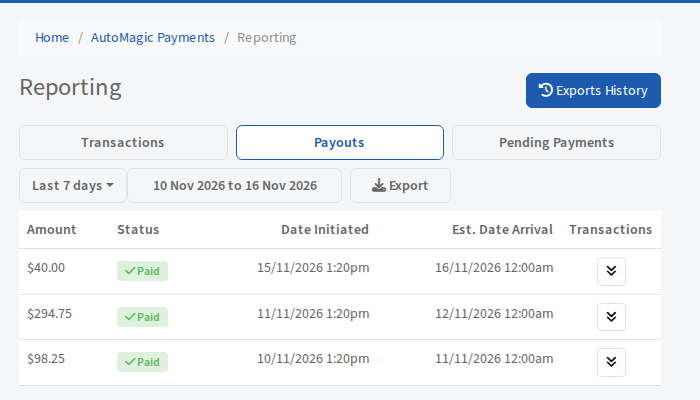
The three tabs
- Transactions lists the customer, amount and date processed for each payment.
- Payouts lists each payout with its amount, its status (Paid, Pending, In Transit, Canceled or Failed), the date it started and the estimated arrival date. Select the arrows on a row to see the payments inside that payout.
- Pending Payments lists failed payments that are being retried or need action, with the attempt number and next retry date. A red number on the tab shows how many. Select Retry now to try one again. See Choose how failed payments are retried.