
Create a recurring billing template
Save a set of recurring amounts once so you can apply it to many customers.
A billing template is a saved set of amounts and days, such as "Monthly retainer, $250 on the beginning of the month". You choose a template when you set up recurring billing for a customer.
Before you start
You need AutoMagic Payments set up. If it is not, the page shows a button to apply for it. See Apply for AutoMagic Payments.
Steps
- Open Settings, then Payments & Billing, then Recurring Billing.
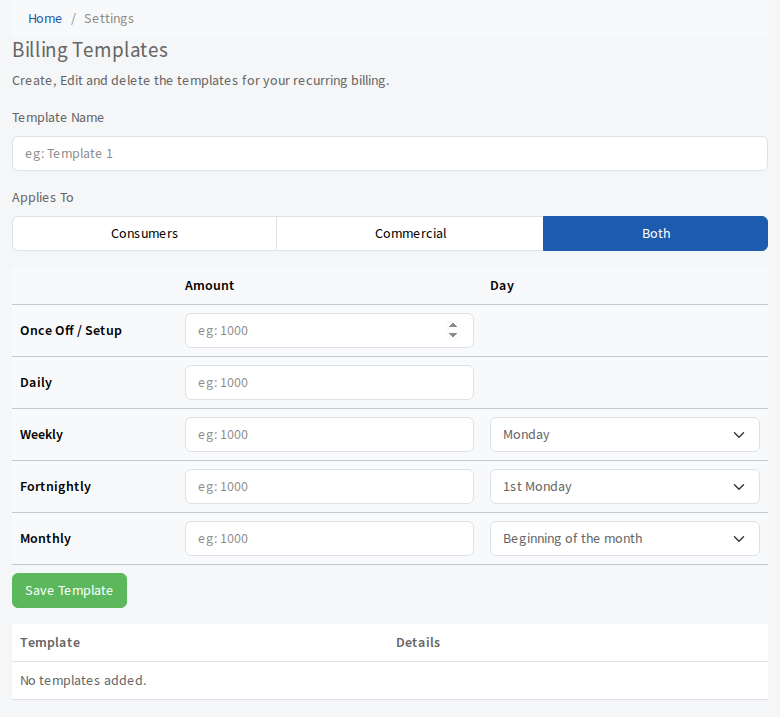
- Enter a Template Name, for example
Monthly retainer. - Under Applies To, choose Consumers, Commercial or Both.
- Enter an Amount for each kind of charge you want. Leave the rest empty.
- Once Off / Setup is charged once.
- Daily is charged every day.
- Weekly is charged on the weekday you choose.
- Monthly is charged at the Beginning of the month, Middle of the month or End of the month.
- Select Save Template.
The template appears in the list below with its details.
Change or delete a template
- Select Edit beside a template, change it and select Save Template. Select Cancel Editing to stop. You are asked to confirm.
- Select Delete and confirm to remove it.