
What to do when a customer matches a sanctions listing
Understand how customers are screened against the DFAT sanctions list and review and record your decision on a match.
Pay My Business screens a customer's verified identity against the DFAT Consolidated Sanctions List when an identity check is done. If nothing matches, the customer goes on as normal and the result is recorded. If something matches, you see a red or amber banner at the top of the customer's page and you decide what happens next.
When there is no match
The customer's page shows a Sanctions screening step that says all clear. The result is recorded on file. There is nothing for you to do.

When there is a match
The top of the customer's page shows a banner. It is headed Sanctions screening, action required before proceeding for a strong match and possible match, please review for a weaker one.
The banner shows two things side by side. On the left is your customer as identified, with their date of birth. On the right is the listing that matched, with its reference number, and whether the name and date of birth line up.
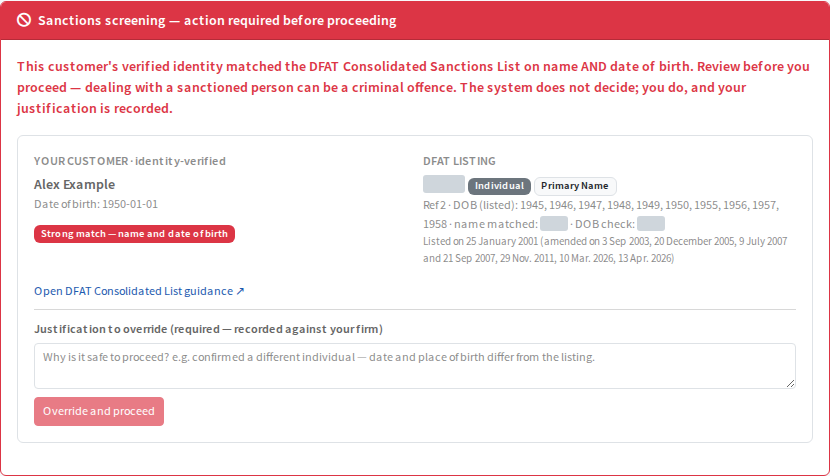
How strong the match is:
- Strong match, name and date of birth. The customer's verified name and date of birth both match the listing.
- Weak match, name only. The name matches but there is no date of birth on the listing to confirm it either way.
The system does not decide for you. You do.
Steps to review and proceed
- Open the customer and read the banner.
- Compare the details on both sides. Select Open DFAT Consolidated List guidance if you want the official guidance.
- If you are satisfied this is a different person, type your reason in the box, for example that the date and place of birth differ from the listing. A reason is required and it is recorded against your firm.
- Select Override and proceed (for a weaker match the button reads Confirm and proceed).
The decision and your reason are added to the customer's compliance timeline and activity record.
What if I think it is the same person?
Do not proceed. Leave the banner as it is and take your own advice. Pay My Business records your decision when you select the button, so only use it when you are satisfied.