
Apply for AutoMagic Payments
Send your application and identity details so you can start collecting payments from customers.
You apply once for your firm. Pay My Business and its payments provider check the details before you can collect money.
Before you start
You need:
- To be a director or the owner of the business.
- The BSB, account name and account number of the Australian bank account you want payments paid into.
- Photo ID for each key person, such as a passport or driver licence.
- Your business website. If you do not have one, use a business social media profile.
Steps
- Open Settings, then Payments & Billing, then AutoMagic Payments.
- Select APPLY FOR AUTOMAGIC PAYMENTS. (If you started earlier, the button reads SETUP AUTOMAGIC PAYMENTS.)
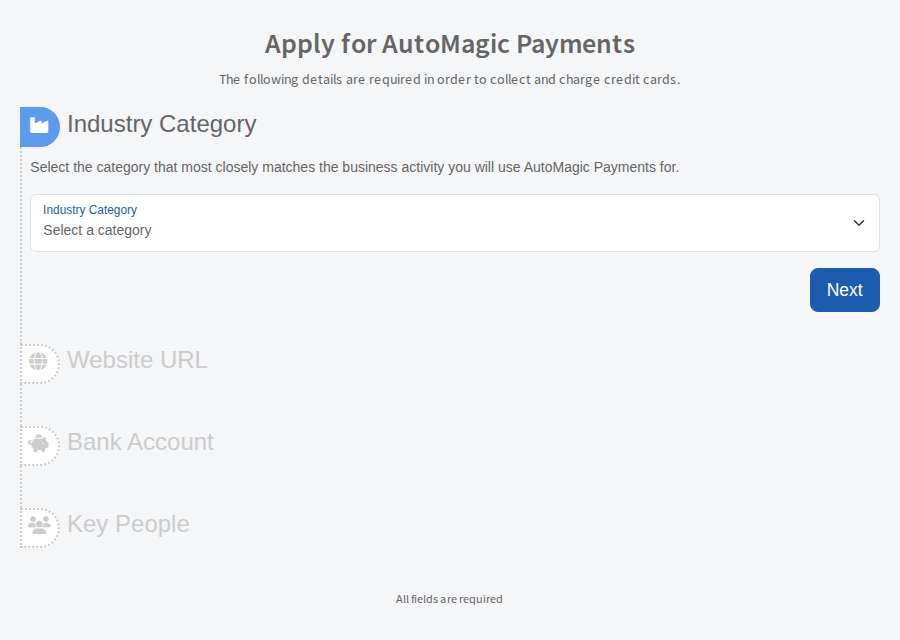
- Under Industry Category, choose the category that best matches the work you will use AutoMagic Payments for. Select Next.
- Under Website URL, enter your website or business social media profile. Select Next.
- Under Bank Account, enter the account you want payments paid into. Select Next.
- Under Key People, add each key person in your business. A sole trader is asked for the owner's contact details instead.
- Select ACCEPT AND SUBMIT.
After you apply
If identity documents are needed, a screen titled "Identity Verification is required for your AutoMagic Payments Application" lists each person with a Scan ID button. Scan or upload their photo ID there.
Until setup is complete the app shows a banner on its pages with a button to carry on where you left off. When verification finishes you can use AutoMagic Payments.