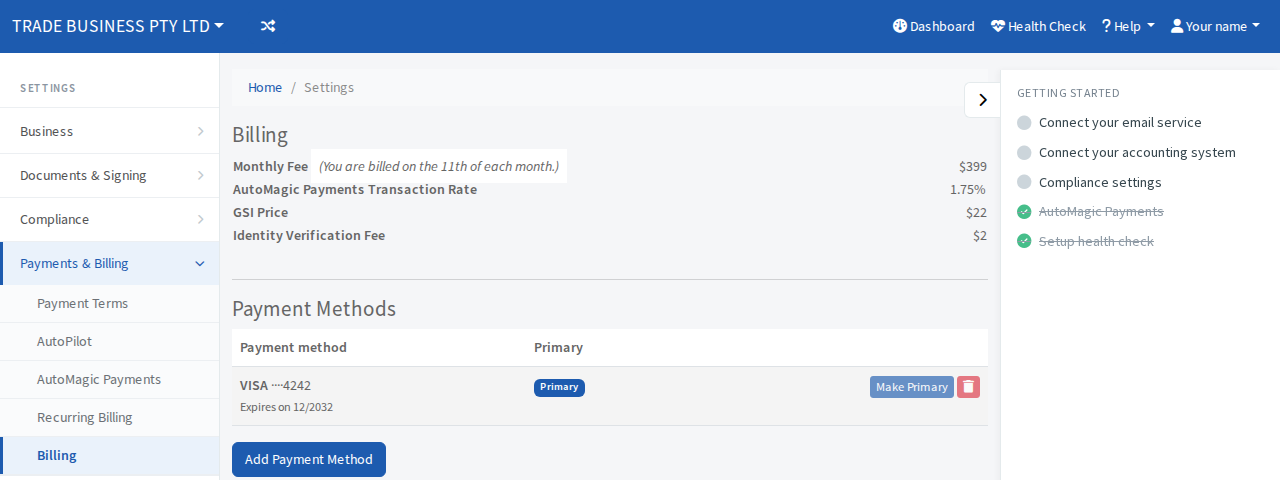
Change the card or bank account you pay Pay My Business with
Add a payment method for your firm's own subscription and choose which one is charged first.
Your firm pays its monthly fee and other charges from a card or bank account saved on the Billing page. You can keep more than one. The primary one is charged first.
Add a payment method
- Open Settings, then Payments & Billing, then Billing.
- Under Payment Methods, select Add Payment Method.
- Enter the card or bank account details.
- Select Add Payment Method. (Select Back to leave without adding one.)
The new method appears in the list marked Secondary.
Choose the primary method
Select Make Primary beside the method you want charged first. The current primary shows a Primary badge and its button is greyed.
Remove a method
Select the bin button beside it. You cannot remove your only method.