
Ask a previous accountant for ethical clearance
Switch on automatic ethical clearance requests, adjust the letter and follow up when the previous accountant cannot be verified.
Ethical clearance is the professional courtesy of checking with a customer's previous accountant before you take them on. It also gives you a chance to hear of any reason not to. Pay My Business collects the previous accountant's details when your customer signs your Terms of Trade and can send the request for you.
Before you start
Your practice must be verified first. See Verify your tax or BAS agent registration.
Turn automatic requests on or off
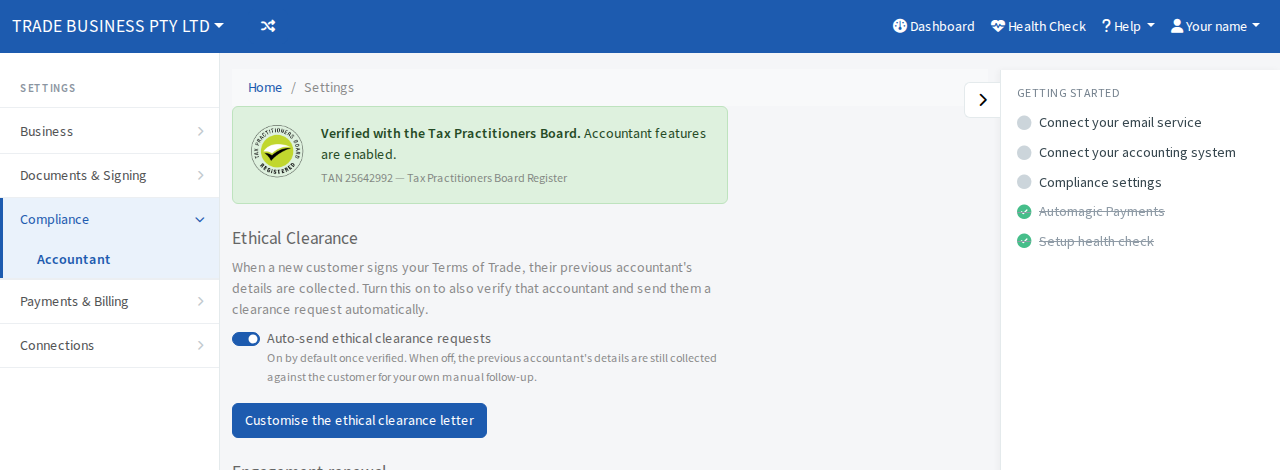
- Open Settings, then Compliance, then Accountant.
- Find Ethical Clearance.
- Use the Auto-send ethical clearance requests switch.
It is on by default once you are verified. When it is on, Pay My Business also checks the previous accountant's registration with the Tax Practitioners Board and then sends them a clearance request by email. When it is off, their details are still kept against the customer so you can follow up yourself.
Change the letter
- On the same screen, select Customise the ethical clearance letter.
- Edit the wording in the window that opens and save it.
The letter is one of your email templates, so you can also find it under your email templates in Settings.
What you see on the customer
When a customer named a previous accountant, their page shows an Ethical Clearance step.
- If the request has not gone yet, select the button on the step to send it once you are ready.
- After it is sent, the step says Ethical Clearance Requested and shows the address it went to.
- If Pay My Business could not verify the previous accountant's registration with the Tax Practitioners Board, no request is sent and the step tells you so. Check the details on the customer's Terms of Trade, then try again.
Related
The same screen also has a switch for the politically exposed person (PEP) declaration. When it is on, customers who sign your Terms of Trade answer a short self-declaration. You see their answer for your own risk assessment. It does not block anything automatically.